
Rental business software · boats, powersports and recreation
Close the office without closing the booking path.
Give guests availability, included items, and collection expectations in one booking flow. With online availability, payment, and confirmation, a ready customer can finish without another callback.
$0/month · standard 10% booking fee · no credit card to create an account
Keep a human help path for the bookings that need one.
Actual product · synthetic demo data
Example dates, prices and location are synthetic; this capture is not specific to a region or operating season.
Customer intent Captured after hours
Inventory Protected during checkout
Morning Confirmed and organized
RecSystems gives rental businesses a complete 24/7 booking path: renters can see live availability, review the full price, reserve inventory, pay a deposit, and receive confirmation without waiting for office hours.
The moment that matters
The customer is ready. Is the answer?
A customer is ready to make a plan. Missing details create extra calls and leave staff reconstructing what was agreed.
- availability, included items, and collection expectations
- the booking details and your published instructions
- the checks and welcome your team provides
How RecSystems helps
Let one booking carry the details.
Show the available rental, explain the full price and published policies, then let the guest complete the required payment. A temporary checkout hold protects selected inventory while payment is completed. Confirmation gives the guest a record to return to.
- See availability and rental details
- Review the full price and payment due
- Complete checkout and receive confirmation
Couch to confirmed
Follow one booking after the office closes.
Available Saturday
Requested rental
Choose a time
Morning briefing
Waiting for the night
Illustrative walkthrough. This walkthrough explains the steps. Inspect the actual product to see the interface.
Actual booking product
See the checkout your customer actually uses.
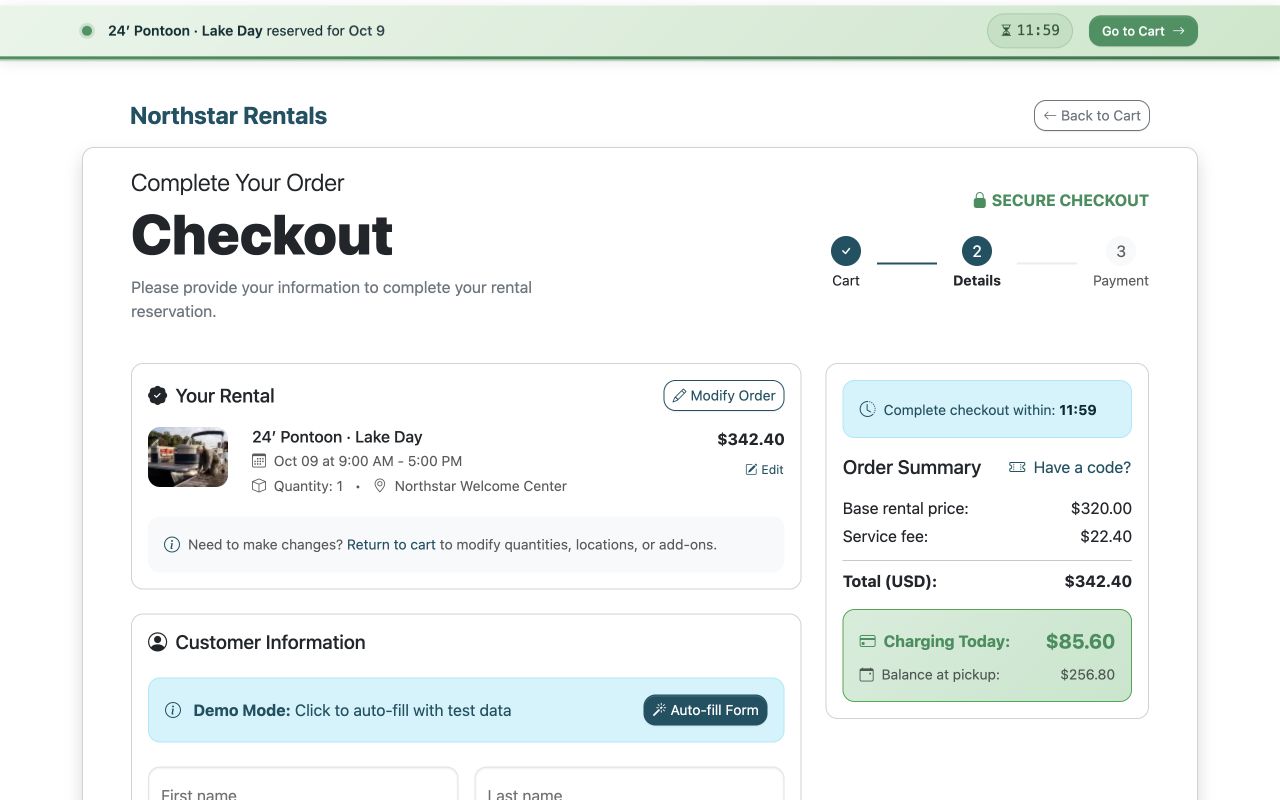
This is the current RecSystems checkout rendered from the working booking engine with a synthetic demo reservation. It shows the hold timer, selected rental, complete price, deposit due today, and balance at pickup. The screenshot uses a configured demo rental. Open the full-size image to inspect the details.
Actual RecSystems interface using a pontoon rental demo. Rental records and proposed actions are synthetic examples.
Actual product · synthetic demo data
Example dates, prices and location are synthetic; this capture is not specific to a region or operating season.
Compare your workflow
Follow one real customer choice.
Your customer needs availability, included items, and collection expectations. Show those details alongside the available rental times and full price. After payment, the customer has a confirmation and your team has the reservation to work from.
- Customer: can I understand what I am choosing?
- Checkout: do I know what is due now?
- Staff: can I find the booking and payment state?
Your first step
Give ready customers a way to book.
Bring availability, included items, and collection expectations into one customer journey: availability, full price, payment, and confirmation. Create your account without a credit card; choose when to move your public booking link. Look for the ordinary customer decision that still needs a callback.
- Create your account without a credit card.
- Explore the customer and staff views.
- Choose when to introduce it to your business.
Your everyday workflow
Let ready customers finish the booking.
Keep your normal availability, price and booking steps clear whenever a customer is ready to reserve.
- Test one complete booking with your team.
- Keep the checks that require a person.
- Verify the change before sending live traffic.
A useful comparison
Make the comparison practical.
Use the process your team follows today. Where does a guest wait, what does staff repeat, and which decision needs a person? Compare those steps against the demonstrated product before deciding what to change.
- Review the booking details and your published instructions.
- Keep the checks and welcome your team provides clear.
- Plan for the follow-up or return process appropriate to the booking.
Check your current workflow
Where does your booking path close?
Answer six questions to find the first step where a ready customer must wait for staff. See your result before creating an account.
Test one complete booking with your team. Think about availability, included items, and collection expectations as you answer.
Your result appears before signup.
Try the questions without creating an account.
Keep control
Change the process at a pace your team can manage.
Keep a human path for guests who need help. Start with one configured rental and test the customer and staff views together before launch. Coordinate availability during any transition: existing systems do not automatically sync.
- Begin with a controlled test
- Keep a clear human help path
- Assign responsibility for availability
The offer, before you switch anything
Start at $0/month. Understand the booking fee before you begin.
Create an account without a credit card. Explore RecSystems before changing how you take bookings, and get clear answers about pricing and fit.
Complete pricing
$0/month
$0 setup fee
Default platform fee: 10% booking fee, configured per account. You choose whether you, the renter, or both share it.
Exact treatment can vary by account agreement. No bookings means no platform fee.
Initial setup
Start without a credit card
Start with your account, one rental, availability, and a test booking. Connecting Stripe for live payments is a separate step.
AI-assisted setup still requires you to review extracted details, pricing, and photos.
Safer transition
Switch at your own pace
Choose one source of availability, a cutover date, and the person who will enter changes. Reconcile existing reservations and confirm import scope before moving your public booking link.
The systems do not automatically sync; parallel operation is a deliberate manual transition.
Support and exit
Plan your setup with a person
Export booking and financial reports. Contact wecare@recsystems.com to close the account. Rex is available in-product around the clock.
Email wecare@recsystems.com for human support and help planning your first test.
How the booking fee works: a simple example
With a $100 rental subtotal and the standard 10% booking fee, the fee is $10. If your account allocates 30% of that fee to you and 70% to the renter, the renter pays $107 and your amount before other adjustments is $97.
This example excludes taxes, refunds and other adjustments. It illustrates the fee split, not a guaranteed payout. Your account agreement and configured payment flow determine the applicable treatment.
Fees can be collected when payment is taken, including a deposit; “booking fee” does not mean the fee waits until the rental ends. Confirm processing treatment, deposits, cancellations, partial refunds and offline payments with our team for your setup.
Ask about my fee setupDirect answers
Frequently asked questions
Can guests finish a reservation after hours?
Yes. A configured RecSystems rental can show availability, pricing and policies, accept the required payment, and provide confirmation online. Staff still handle questions or exceptions outside the normal booking.
What happens if two customers choose the same rental?
RecSystems temporarily holds selected inventory during checkout while the customer completes payment. Availability in a separate booking system still needs coordination; the systems do not automatically sync.
What should we make clear before guests book?
For recreational rentals, start with availability, included items, and collection expectations. Review those details in the customer view rather than assuming a category name explains the whole experience.
Can we keep taking bookings by phone?
Yes. Keep a staff-assisted path for guests who prefer it. Decide who maintains availability while you test and transition, then move your public booking link when the process is ready.
What happens after you start
- 1. Give ready customers a way to book.
- 2. Test one complete booking with your team.
- 3. Review the result with your team before using the live flow.
One clear next step
Let customers book your recreational rentals online.
From availability, included items, and collection expectations to payment and confirmation, keep the normal reservation moving—even when your team is away.
No credit card to create your account. Explore before changing your current process.
Create my account$0/month · standard 10% booking fee · no credit card to create an account
Have a question about your operation? Our team can help you check the fit.