
Rental business software · boats, powersports and recreation
Give your team faster answers without giving AI the final say.
“What does this customer need to know before arrival?” Give staff a place to find approved information. Rex helps with lookups and prepares options; your team keeps the decisions that need judgment.
$0/month · standard 10% booking fee · no credit card to create an account
A helpful answer supports your team. It does not replace their judgment.
Actual product · synthetic demo data
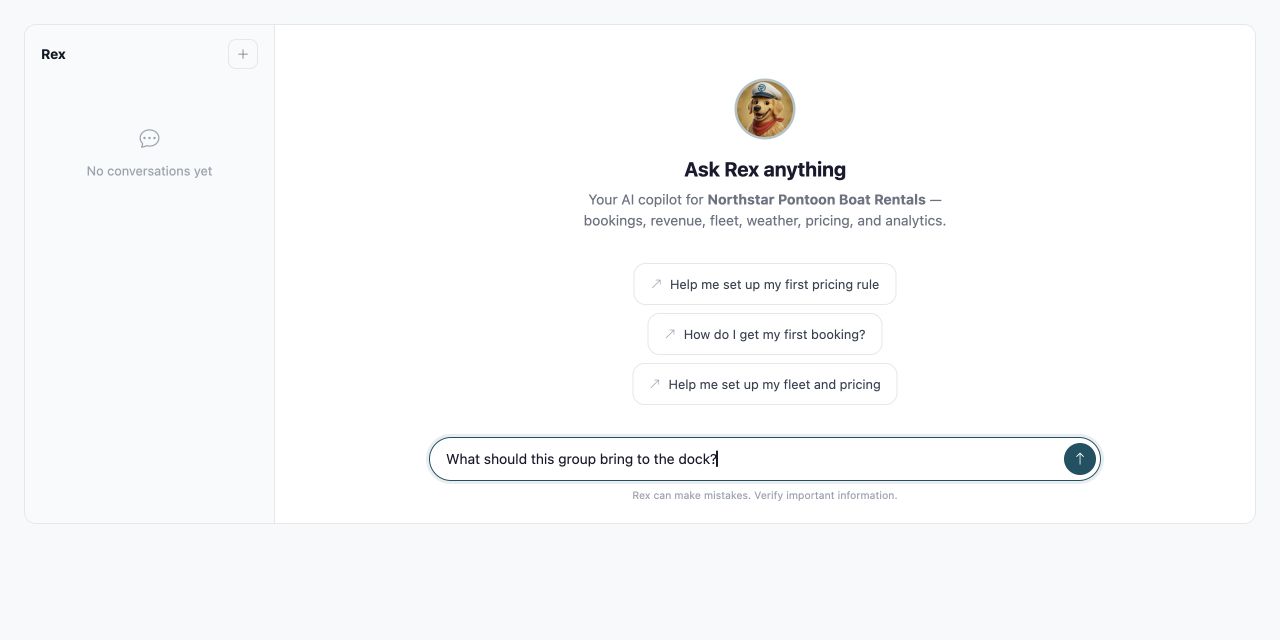
Example dates, prices and location are synthetic; this capture is not specific to a region or operating season.
Handle Routine and approved
Suggest Context ready for review
Ask Me Human decision required
RecSystems uses human-controlled AI to give rental staff approved answers and review-ready suggestions while reserving refunds, damage, safety, and unusual exceptions for an authorized person.
The moment that matters
A routine question should not stop the shift.
A new team member asks: “What does this customer need to know before arrival?” The owner is helping someone else. Put the booking information beside the person answering the guest.
- availability, included items, and collection expectations
- the booking details and your published instructions
- the checks and welcome your team provides
How RecSystems helps
Show the answer—and where assistance stops.
A useful staff assistant finds the booking or approved policy before suggesting a next step. For an exception, Rex can prepare the available context for review. Refunds and other consequential actions need the responsible person; a suggested answer is not permission to act.
- Find the relevant booking or policy
- Review the information and any uncertainty
- Take consequential decisions to a person
The authority checkride
Increase the stakes and watch where Rex stops.
Handle
Approved routine
Suggest
Prepare for review
Ask Me
Human authority
Rex
Ask: What does this customer need to know before arrival?
Decision owner
Within approved boundary
Illustrative walkthrough. These decision zones explain the workflow; they do not configure product permissions. This walkthrough explains the steps. Inspect the actual product to see the interface.
Actual operator product
Rex supports the operator—and approval stays visible.
This is the actual Operator Rex workspace and a pricing proposal awaiting review. Synthetic demo-account data. The screen demonstrates these controls; review the permissions and supported behavior for each action your team will use.
Actual RecSystems interface using a pontoon rental demo. Rental records and proposed actions are synthetic examples.
Actual product · synthetic demo data

Example dates, prices and location are synthetic; this capture is not specific to a region or operating season.
Compare your workflow
One familiar question. A clearer next step.
“What does this customer need to know before arrival?” Rex helps staff look up the relevant booking or approved information and prepare options. If the request needs an exception, a responsible person makes the decision.
- Ask a recurring staff question
- Check the answer against your approved information
- Test a missing answer and an exception
Your first step
Give the next shift a place to find answers.
Start with a question your team already asks: “What does this customer need to know before arrival?” Explore how Rex brings booking information and approved business knowledge within reach, with your team responsible for decisions and exceptions. Start with the question a new team member should not have to guess.
- Create your account without a credit card.
- Explore the customer and staff views.
- Choose when to introduce it to your business.
Your everyday workflow
Start with the question staff asks every day.
Put the booking and business information behind repeated questions within reach.
- Test one complete booking with your team.
- Keep the checks that require a person.
- Verify the change before sending live traffic.
A useful comparison
Make the comparison practical.
Use the process your team follows today. Where does a guest wait, what does staff repeat, and which decision needs a person? Compare those steps against the demonstrated product before deciding what to change.
- Review the booking details and your published instructions.
- Keep the checks and welcome your team provides clear.
- Plan for the follow-up or return process appropriate to the booking.
Check your current workflow
What should Rex handle, suggest, or ask you?
Choose where you want staff assistance and human decisions. This self-assessment does not configure product permissions; review each supported action with your team.
Test one complete booking with your team. Think about availability, included items, and collection expectations as you answer.
Your result appears before signup.
Try the questions without creating an account.
Keep control
Start with a question. Check the answer.
Rex supports your team; it does not replace the checks and welcome your team provides. Test your approved information, missing answers, and exception handling before a live shift.
- Begin with a controlled test
- Keep a clear human help path
- Review the authority for each action
The offer, before you switch anything
Start at $0/month. Understand the booking fee before you begin.
Create an account without a credit card. Explore RecSystems before changing how you take bookings, and get clear answers about pricing and fit.
Complete pricing
$0/month
$0 setup fee
Default platform fee: 10% booking fee, configured per account. You choose whether you, the renter, or both share it.
Exact treatment can vary by account agreement. No bookings means no platform fee.
Initial setup
Start without a credit card
Start with your account, one rental, availability, and a test booking. Connecting Stripe for live payments is a separate step.
AI-assisted setup still requires you to review extracted details, pricing, and photos.
Safer transition
Switch at your own pace
Choose one source of availability, a cutover date, and the person who will enter changes. Reconcile existing reservations and confirm import scope before moving your public booking link.
The systems do not automatically sync; parallel operation is a deliberate manual transition.
Support and exit
Plan your setup with a person
Export booking and financial reports. Contact wecare@recsystems.com to close the account. Rex is available in-product around the clock.
Email wecare@recsystems.com for human support and help planning your first test.
How the booking fee works: a simple example
With a $100 rental subtotal and the standard 10% booking fee, the fee is $10. If your account allocates 30% of that fee to you and 70% to the renter, the renter pays $107 and your amount before other adjustments is $97.
This example excludes taxes, refunds and other adjustments. It illustrates the fee split, not a guaranteed payout. Your account agreement and configured payment flow determine the applicable treatment.
Fees can be collected when payment is taken, including a deposit; “booking fee” does not mean the fee waits until the rental ends. Confirm processing treatment, deposits, cancellations, partial refunds and offline payments with our team for your setup.
Ask about my fee setupDirect answers
Frequently asked questions
How does Rex help staff during a shift?
Rex helps staff look up booking information and approved business knowledge, and prepares options for review. The useful first test is a question your team already asks repeatedly.
Does Rex make refund decisions?
Rex can prepare a refund preview and direct an operator to the cart. The operator processes the refund. Test the permissions and supported actions you intend staff to use.
What should we test before staff rely on an answer?
Ask “What does this customer need to know before arrival?” and compare the answer with your approved information. Then try a missing detail and a request outside the policy. Keep the checks and welcome your team provides with your team.
What if an answer is missing or unclear?
Bring the question to the responsible person and review the information available to Rex. Do not treat a plausible answer as an approved policy. Include missing and conflicting information in your first test.
What happens after you start
- 1. Give the next shift a place to find answers.
- 2. Test one complete booking with your team.
- 3. Review the result with your team before using the live flow.
One clear next step
Put answers about recreational rentals within reach.
The next question may be “What does this customer need to know before arrival?” Give staff a place to look up the booking and approved information, with a person handling the exception.
No credit card to create your account. Explore before changing your current process.
Create my account$0/month · standard 10% booking fee · no credit card to create an account
Have a question about your operation? Our team can help you check the fit.